
RPD
--
--
--
You can query data within 3 years
Today
Syncing today's request limits, token limits, and credit card status.
Total Cost
\$0.00
Total Requests
0
Web Searches
0
Images
0
Total Tokens
0
Input Tokens
0
Output Tokens
0
Cache R/W
0
| Model | Requests | Searches | Input Tokens | Output Tokens | Cache R/W | Images | Cost | Percentage |
|---|
| Date | Requests | Cost | Tokens | Images | Primary Model |
|---|
Update the alias shown in the top-right corner, your login email, and billing notifications
Supported format: XAI API Keys starting with sk-Xvs...
✨ The XAI platform is compatible with virtually all major AI providers and model ecosystems, supporting unified integration and flexible switching.
One entrypoint handles auth, routing, and normalization before reaching model providers.
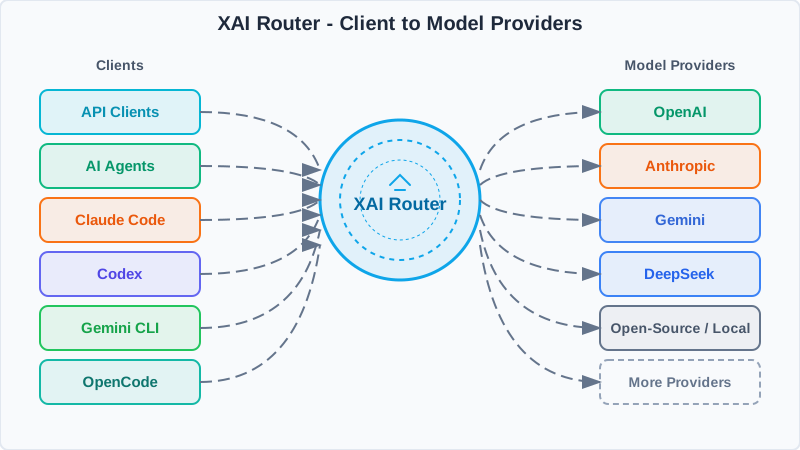
Use one XAI API key and a unified base_url.
Policies, model mapping, rate limits, and observability live in the router.
Requests go to OpenAI, Claude, Gemini, and more, then normalize on the way back.
import os
from openai import OpenAI

XAI_API_KEY = os.getenv("XAI_API_KEY")
client = OpenAI(
    api_key=XAI_API_KEY,
    base_url="",
)

completion = client.chat.completions.create(
    model="gpt-5",
    messages=[
	{"role": "system", "content": "You are AI"},
	{"role": "user", "content": "What is the meaning of life, the universe, and everything?"},
    ],
)

print(completion.choices[0].message)import os
from anthropic import Anthropic
XAI_API_KEY = os.getenv("XAI_API_KEY")
client = Anthropic(
api_key=XAI_API_KEY,
base_url="",
)
message = client.messages.create(
model="claude-sonnet-4-6",
max_tokens=128,
system="You are AI.",
messages=[
{
"role": "user",
"content": "What is the meaning of life, the universe, and everything?",
},
],
)
print(message.content)curl /responses \
-H "Content-Type: application/json" \
-H "Authorization: Bearer $XAI_API_KEY" \
-d '{
"model": "gpt-5.5",
"input": "Explain what the Responses API does in one sentence."
}'curl /chat/completions \
-H "Content-Type: application/json" \
-H "Authorization: Bearer $XAI_API_KEY" \
-d '{
"model": "gpt-5.2",
"messages": [
{
"role": "developer",
"content": "You are a helpful assistant."
},
{
"role": "user",
"content": "Hello!"
}
]
}'curl /v1/messages \
-H 'Content-Type: application/json' \
-H 'anthropic-version: 2023-06-01' \
-H "X-Api-Key: $XAI_API_KEY" \
-d '{
"max_tokens": 1024,
"messages": [
{
"content": "Hello, world",
"role": "user"
}
],
"model": "claude-sonnet-4-6"
}'No recharge records
No digital goods orders
Unified setup notes for Codex CLI / Codex App / Claude Code / OpenCode.
Unified prerequisite: all examples use the XAI Router gateway.
The page fills the compatible endpoint and current login key for each tool, so
users do not need to choose between OpenAI and Anthropic endpoints manually. Codex
writes to ~/.codex/auth.json, Claude Code uses
ANTHROPIC_AUTH_TOKEN, and OpenCode uses
XAI_API_KEY.
Codex now only supports wire_api = "responses".
On Linux / macOS, copy the one-shot command below first: the page inserts the
current XAI API Key automatically, so the user only needs to paste it into a terminal.
Manual setup only needs two files: ~/.codex/config.toml and
~/.codex/auth.json. On Windows, use
%USERPROFILE%\.codex\config.toml and
%USERPROFILE%\.codex\auth.json.
mkdir -p ~/.codex

cat > ~/.codex/config.toml <<'EOF'
model_provider = "xai"
model = "gpt-5.5"
model_reasoning_effort = "xhigh"
plan_mode_reasoning_effort = "xhigh"
model_reasoning_summary = "none"
model_context_window = 1050000
model_auto_compact_token_limit = 945000
stream_idle_timeout_ms = 900000
approval_policy = "never"
sandbox_mode = "danger-full-access"
suppress_unstable_features_warning = true

[model_providers.xai]
name = "OpenAI"
base_url = ""
wire_api = "responses"
experimental_bearer_token = "sk-Xvs..."
requires_openai_auth = true
supports_websockets = true

[features]
responses_websockets_v2 = true
goals = true
remote_connections = true
EOF

cat > ~/.codex/auth.json <<'EOF'
{
  "OPENAI_API_KEY": "sk-Xvs..."
}
EOF

chmod 600 ~/.codex/auth.json

codex
When copying the command above, the page automatically inserts the current
XAI API Key into both the config.toml
experimental_bearer_token field and auth.json. If
auth.json is later overwritten by Codex login, model requests still go
through XAI Router.
model_provider = "xai"
model = "gpt-5.5"
model_reasoning_effort = "xhigh"
plan_mode_reasoning_effort = "xhigh"
model_reasoning_summary = "none"
model_context_window = 1050000
model_auto_compact_token_limit = 945000
stream_idle_timeout_ms = 900000
approval_policy = "never"
sandbox_mode = "danger-full-access"
suppress_unstable_features_warning = true

[model_providers.xai]
name = "OpenAI"
base_url = ""
wire_api = "responses"
experimental_bearer_token = "sk-Xvs..."
requires_openai_auth = true
supports_websockets = true

[features]
responses_websockets_v2 = true
goals = true
remote_connections = true{
"OPENAI_API_KEY": "sk-Xvs..."
}if not exist "%USERPROFILE%\.codex" mkdir "%USERPROFILE%\.codex"
notepad "%USERPROFILE%\.codex\config.toml"
notepad "%USERPROFILE%\.codex\auth.json"
codexNew-Item -ItemType Directory -Force "$env:USERPROFILE\.codex" | Out-Null
notepad "$env:USERPROFILE\.codex\config.toml"
notepad "$env:USERPROFILE\.codex\auth.json"
codex
On Windows, paste the TOML and JSON blocks above into the two files Notepad opens,
save them, then run codex.
Claude Code integration is primarily environment-variable based.
The following examples map Claude defaults to
gpt-5.5 using
.
Order: copy the environment variables for your shell first, then
run claude.
export ANTHROPIC_AUTH_TOKEN="sk-Xvs..."
export ANTHROPIC_BASE_URL=""
# Optional: custom default model mapping for Claude families (not required)
export ANTHROPIC_DEFAULT_OPUS_MODEL="gpt-5.5"
export ANTHROPIC_DEFAULT_SONNET_MODEL="gpt-5.4"
export ANTHROPIC_DEFAULT_HAIKU_MODEL="gpt-5.4-mini"set ANTHROPIC_AUTH_TOKEN=sk-Xvs...
set ANTHROPIC_BASE_URL=
:: Optional: custom default model mapping for Claude families (not required)
set ANTHROPIC_DEFAULT_OPUS_MODEL=gpt-5.5
set ANTHROPIC_DEFAULT_SONNET_MODEL=gpt-5.4
set ANTHROPIC_DEFAULT_HAIKU_MODEL=gpt-5.4-mini$env:ANTHROPIC_AUTH_TOKEN="sk-Xvs..."
$env:ANTHROPIC_BASE_URL=""
# Optional: custom default model mapping for Claude families (not required)
$env:ANTHROPIC_DEFAULT_OPUS_MODEL="gpt-5.5"
$env:ANTHROPIC_DEFAULT_SONNET_MODEL="gpt-5.4"
$env:ANTHROPIC_DEFAULT_HAIKU_MODEL="gpt-5.4-mini"claude
Verify with: claude
OpenCode should use the global config file
~/.config/opencode/opencode.jsonc (Windows:
%USERPROFILE%\.config\opencode\opencode.jsonc).
Write the JSONC below into the config file, then set
XAI_API_KEY in your shell and run the
verification command.
Order: copy the Responses API config first, then copy the shell command for your OS.
{
  "$schema": "https://opencode.ai/config.json",
  "model": "openai/gpt-5.5",
  "small_model": "openai/gpt-5.5",
  "provider": {
    "openai": {
      "options": {
        "baseURL": "",
        "apiKey": "{env:XAI_API_KEY}"
      },
      "models": {
        "gpt-5.5": {
          "headers": {
            "originator": "opencode"
          }
        }
      }
    }
  },
  "agent": {
    "title": {
      "options": {
        "reasoningEffort": "none"
      }
    },
    "build": {
      "variant": "xhigh",
      "options": {
        "reasoningSummary": "detailed",
        "textVerbosity": "high"
      }
    },
    "plan": {
      "variant": "xhigh",
      "options": {
        "reasoningSummary": "detailed",
        "textVerbosity": "high"
      }
    }
  },
  "permission": {
    "*": "allow",
    "external_directory": "allow",
    "doom_loop": "allow"
  }
}export XAI_API_KEY="sk-Xvs..."
opencode debug config
opencode run "hello"set XAI_API_KEY=sk-Xvs...
opencode debug config
opencode run "hello"$env:XAI_API_KEY="sk-Xvs..."
opencode debug config
opencode run "hello"
Verify with: opencode debug config (config) and opencode run "hello" (request)
This account has no sub-accounts
This action cannot be undone. The sub-account Key will be immediately invalidated.
Loading billing data...
Please verify network access and API permissions, then retry
Total Cost
$0.00
Total Requests
0
Web Searches
0
Images
0
Total Tokens
0
Input Tokens
0
Output Tokens
0
Cache R/W
0
Compare sub-account request and spend distribution to flag anomalies quickly.
| ID | User | Requests | Searches | Input Tokens | Output Tokens | Cache R/W | Images | Highest-Cost Model | Most Requested Model | Spend | Spend Share | Request Share |
|---|
Summarize request share and cost structure to pinpoint primary cost drivers.
| Model | Requests | Searches | Input | Output | Spend | Request Share | Spend Share |
|---|
Review daily totals, model share, and cache activity across the selected range.
| Time | Action | Target | Details | IP |
|---|
Loading logs...
No activity logs available
Please keep this key secure, it will be used for sub-account API authentication
💡 Tip: Please notify the sub-account owner to check their email for the API key
Sub-account Editor